Showing posts with label CUE STEAMPunk. Show all posts

Wednesday, May 2, 2018

CUE STEAMpunk: Lab Disc

Guest Post by Karla Orosco


CUE Steampunk: Globisens GenSci Labdisc Blog Entry

Karla Orosco, 7th Grade Science Teacher at Admiral Akers at NAS Lemoore
@oroscoscience, karlacalbear@gmail.com


I checked out the GenSci Labdiscs for my 7th grade NGSS integrated classroom for 2 weeks. My tech department was awesome about quickly loading the Globilab App and away we went. My students downloaded the user's guide and previewed it before I passed out a labdisc to the group. The kit has everything except the pH sensor.


Here is just a preview of what it does:


I really didn’t try to go over each function or feature with the students because part of the excitement was discovering for themselves. I did have to go over the distance tool because that was a little confusing.


I made one student the leader of each group of 5-7 students and that student paired the labdisc to his/her iPad for all the tests. The students took turns using the labdisc and using the iPad to look at the data generated.


It took 3 days for the students to really understand all the functions and learn to use them. I found the Lessons LIbrary Website good but I modified a few to make them work for my class.


One challenge was to make a path from one place on campus to another and find the distance with the Labdisc, write down the path then give to another group and see if they could get the same measurement with written instructions given by the other group. Students had fun with this and enjoyed giving another group a challenge.


I could use these all year alone for the data that is generated by the app and have students work understanding the data that they generated. I wish we spent more time learning the app features in addition to the labdisc features.

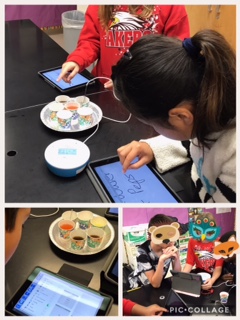
Clockwise from upper left: My students measuring distance, taking the temperature of different liquids that I got from a freezer, fridge, room temperature and outside, a student pairing labdisc to her iPad for the day, looking at app data, and taking an external temperature.


There is a learning curve on these devices but if you are flexible with time and lessons this is a powerful scientific and measurement tool.  I plan to try to check out again earlier in the year if possible to go along with my measurement adventures unit. I highly encourage all CUE members to check these out and let students explore with them.

Sunday, October 2, 2016

Piper, Raspberry Pi, Minecraft & CUE STEAMpunk

Piper

While at Edcamp Yosemite I was afforded the chance to get 4 Piper Computer kits to take home put together and use with students. Little did I know how much students would enjoy and learn from these Piper computer kits.


What Is Piper?


Here is how Piper is described on the Play Piper website. Piper is both a computer and an invention kit. Play a Minecraft mod that guides you to craft electronics and gadgets. 

Pictures on the right is a completed Piper Computer. Each kit has a Raspberry Pi 3 and a rechargeable battery to power the computer. When you first turn it on and connect to the internet via wifi it will update. 


Student reaction to first time with Piper.

After assemblying the Piper computers I visited one of our K-5 Elementary Schools with Piper. We had about 90 minutes the first time to try out the Pipers with 5th grade students. I showed the students how to plug in the battery and turn Piper on. Students were told they had to play minecraft in Story Mode to start. At this announcement we had a few "awes" from the students as they wanted to go into creative mode first. Other than telling students to click on story mode very little direction was given other than "go forth and explore". I had to smile big when just 5 minute after the "awes" of story mode I had a group of three boys that were working together say "this is better than regular minecraft". For the next 90 minutes students worked with the Piper Computers in the PiperUniverse and set-up buttons, switches, breadboards and curcits. One student went so far we had to go online and update the computer with the next story.


Piper was such a hit with students that my District has asked for a quote on 30 Piper Computers for our schools. 

Thanks to CUE STEAMpunk and the loan of Mobile Labs my District is able to see students try out equpiment before making the fincial investment. We are slowly putting together our own Maker Lab. 

If you have never requested a CUE STEAMpunk I would highly recommend you go to their website and check out all the cool stuff they have for loan. 


THANK YOU CUE!

THANK YOU JON CORIPPO!

CUE STEAMpunk ROCKS!

Sunday, September 20, 2015

Knock At The Door

CUE STEAMPunk

Only moments after the bell rang for 7th and 8th grade lunch to begin there was a knock at the door. Upon opening the door there stood several students wanting to know could they spend their lunch time programming the Sphero robot's that they had been working with earlier in the day during class. The teacher that was in the room at the time said she did not know how to work them and the students said 'We can teach you'. 

How great is it when students are so engaged in learning that they come back during lunch because they can not get enough. Several have even talked their parents into purchasing Sphero's!They can just can not get enough. 

So what is CUE STEAMPunk and how did this start? When reading the Summer 2015 issue of OnCue Journal this add caught my attention

I emailed Jon Corippo and he set me up with some Sphero 2.0's with start-up curriculum for a few weeks. Because I'm know a TOSA for Instructional Technology I worked with a couple middle school classes to get the STEAMPunk labs rolling. 

Students started with the basic drive feature and then quickly moved on to using the Tickle app to challenge each other with more and more difficult patterns to program. They mapped out tracks with electrical tape on the floor and challenged each other to see who could move through it the fastest, slowest, stay inside the lines with most accuracy, change colors on turns, etc. Area of shape was calculated. Programming, math, artistic side with light show, what's next...

Students that would not always work together were helping each other. This is not just about programming or technology, it is teaching social skills and critical thinking all wrapped in one. 

What is CUE STEAMPunk it is education at it best! 


Who is next? Don't wait open up your email and contact Jon now. Because if you don't I'll take them back so they don't collect dust!!! You hear me Jon!!! No dust collecting if no one else wants them they will always have a home in room 11!