Showing posts with label CUE. Show all posts

Wednesday, May 2, 2018

CUE STEAMpunk: Lab Disc

Guest Post by Karla Orosco


CUE Steampunk: Globisens GenSci Labdisc Blog Entry

Karla Orosco, 7th Grade Science Teacher at Admiral Akers at NAS Lemoore
@oroscoscience, karlacalbear@gmail.com


I checked out the GenSci Labdiscs for my 7th grade NGSS integrated classroom for 2 weeks. My tech department was awesome about quickly loading the Globilab App and away we went. My students downloaded the user's guide and previewed it before I passed out a labdisc to the group. The kit has everything except the pH sensor.


Here is just a preview of what it does:


I really didn’t try to go over each function or feature with the students because part of the excitement was discovering for themselves. I did have to go over the distance tool because that was a little confusing.


I made one student the leader of each group of 5-7 students and that student paired the labdisc to his/her iPad for all the tests. The students took turns using the labdisc and using the iPad to look at the data generated.


It took 3 days for the students to really understand all the functions and learn to use them. I found the Lessons LIbrary Website good but I modified a few to make them work for my class.


One challenge was to make a path from one place on campus to another and find the distance with the Labdisc, write down the path then give to another group and see if they could get the same measurement with written instructions given by the other group. Students had fun with this and enjoyed giving another group a challenge.


I could use these all year alone for the data that is generated by the app and have students work understanding the data that they generated. I wish we spent more time learning the app features in addition to the labdisc features.

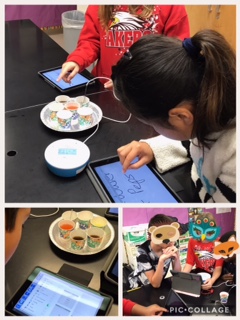
Clockwise from upper left: My students measuring distance, taking the temperature of different liquids that I got from a freezer, fridge, room temperature and outside, a student pairing labdisc to her iPad for the day, looking at app data, and taking an external temperature.


There is a learning curve on these devices but if you are flexible with time and lessons this is a powerful scientific and measurement tool.  I plan to try to check out again earlier in the year if possible to go along with my measurement adventures unit. I highly encourage all CUE members to check these out and let students explore with them.

Monday, February 19, 2018

Boldly Go Flexible!!

Classroom Redesign Journey


In 2016 CUE held what was then called Classroom Cribs conference. In 2017 the name changed to CUE BOLD and I attended the first CUE Bold event. In the fall of 2016, I was a newly assigned Instructional Technology TOSA. Having been a music director for 25 years I knew what great innovative music rooms look and feel like. But I did not have a good grasp on what an Innovative Classroom outside the music world looked and felt like. This is where CUE BOLD helped fill the gaps in my knowledge.


The main thing I like about CUE BOLD is that pedagogy is put first. I should stop here and say that BOLD stands for Blended and Online Learning Design! I came back from the Classroom Cribs one-day event excited and ready to start transforming our schools. I meet with my Superintendent and Deputy Superintendent to share what I had learned.


After going to CUE BOLD in 2017 I had a more focused idea of how to move forward in creating flexible learning spaces. After several meetings with our Deputy Superintendent, we developed a plan that went as follows.


We held a series of informal meetings at all five of our campuses (K-12) to talk about and answer questions teachers had about flexible classrooms. Due to the passing of a large bond we had the money in our facilities fund that we could use to start transforming classrooms. Teachers that attended these meetings were then given the opportunity to fill out a Google Survey on their interest in moving forward with redesigning their classroom. In this survey we asked questions like:


What kind of changes would you like to see?
If you had to prioritize one change what would it be?
Thinking about addition but subtraction what would you subtract?


All completed surveys were reviewed and site principals had a chance to way in on which classrooms they would like to see redesigned. Once we had narrowed down how many classrooms and grade levels of these classes we meet with Meteor Education. Meteor helped us define the types of furniture we would put in each classroom.


Our School Board approved the plan we had designed and the purchase order was placed near the end of the 2016-2017 school year. Due to the time needed for furniture to be shipped and arrive we scheduled the install for October 2017 during our Fall break. For phase II we will have the order placed in time for install during the summer but for phase II liked that students started the year with the old and had the room transform physically during the break. Seeing the student's faces and their excitement the first day with the new furniture was priceless!  


I don’t want to fool anyone, it has not been all rosy with the changes made. The new room design has stretched some of our teachers. We have had some failures with desks that have broken and engeryball chairs that students have punchered with pencils. But the benefits far outway the problems. Many of the teachers whose rooms we redesigned have been purging their rooms of items that very easily clutter a classroom. Items such as large teacher desks being replaced by a small workstation, bookcase, and filing cabinets.


Now when I walk in the classrooms that were redesigned you see heightened student engagement, increase in collaborative work and students taking ownership of their learning.


We are not finished as our journey has just begun to shift our classrooms. It has been an exciting journey to BOLDLY GO FLEXIBLE!

Sunday, September 20, 2015

Knock At The Door

CUE STEAMPunk

Only moments after the bell rang for 7th and 8th grade lunch to begin there was a knock at the door. Upon opening the door there stood several students wanting to know could they spend their lunch time programming the Sphero robot's that they had been working with earlier in the day during class. The teacher that was in the room at the time said she did not know how to work them and the students said 'We can teach you'. 

How great is it when students are so engaged in learning that they come back during lunch because they can not get enough. Several have even talked their parents into purchasing Sphero's!They can just can not get enough. 

So what is CUE STEAMPunk and how did this start? When reading the Summer 2015 issue of OnCue Journal this add caught my attention

I emailed Jon Corippo and he set me up with some Sphero 2.0's with start-up curriculum for a few weeks. Because I'm know a TOSA for Instructional Technology I worked with a couple middle school classes to get the STEAMPunk labs rolling. 

Students started with the basic drive feature and then quickly moved on to using the Tickle app to challenge each other with more and more difficult patterns to program. They mapped out tracks with electrical tape on the floor and challenged each other to see who could move through it the fastest, slowest, stay inside the lines with most accuracy, change colors on turns, etc. Area of shape was calculated. Programming, math, artistic side with light show, what's next...

Students that would not always work together were helping each other. This is not just about programming or technology, it is teaching social skills and critical thinking all wrapped in one. 

What is CUE STEAMPunk it is education at it best! 


Who is next? Don't wait open up your email and contact Jon now. Because if you don't I'll take them back so they don't collect dust!!! You hear me Jon!!! No dust collecting if no one else wants them they will always have a home in room 11!


Tuesday, June 24, 2014

Cue Rockstar & the Flu


When the flu hits the day before Rural Rockstar one would think that would mean all hope of the best summer PD is over. But I was not to be fully denied access to Rockstar. So laptop, iPad and phone close at hand, twitter open and texting a fellow teacher from my bed I made the best of it.

I might not have spent an hour or two putting together a lesson for the up coming school year but I was able to collect some resources and names and twitter handles of folks to contact if I have questions before the fall.

Both John Miller (@room162) and Sam Patterson (@SamPatue) presented on blogging. While I started blogging with students last year for the first time it is always great to see what other educators are doing with their classes.
 
John Miller also did a session on Minecraft Edu. If there was one session I truly wish I could have been in the room for this is it. However that being said I have the link to John's web page of resources which I hope he does not mind me posting the link here

My friend that was texting me said that Will Kimbley (@willkimbley) did a great session on google chrome apps and extensions. 

Kristen Berg (@mrsqueenberg) APPs that APPly to Common Core is worth a look for anyone using an iPad in the classroom. Check out the link here

Having been to CUE Rockstar Hornet I can say going in person is definitely the way to go. However if life gets in the way and you can't show up in person don't let that stop you from gaining from the great educators at Rockstar!